Overview
nyx.vfx is a real-time 2D VFX engine that creates particle systems for midi events. It's a work-in-progress, but that shouldn't take away from making cool designs and exporting them for use in post-processing and video-editing tools.
Tweaker's Dream
The nyx.vfx plugin is not for folks who want to pop open a plugin, select a preset, and then sit back. It's an experimental VFX playground. Although nyx.vfx has export and import settings buttons, it's not a first-class citizen.
Requirements
You need to have a GPU that supports OpenGL 4.6. Just like with games, the beefier GPU you have, the better this plugin will run. OpenGL 4.6 has been out for a long time and is very well supported.
Setting Up
Although you can open multiple instances of nyx.vfx, for performance reasons it's best to only have one open.
- Create a new track in your DAW and load
nyx.vfx - Route midi output from other tracks to the track with
nyx.vfxon it using different channels (e.g., drums on channel 1, bass synth on channel 2, etc.)
Now you can independently control each instrument's VFX output.

Navigating
Frame Diagnostics
This is important to understand and monitor as you begin putting more load on the plugin. If any part of it turns red, then you have a problem.
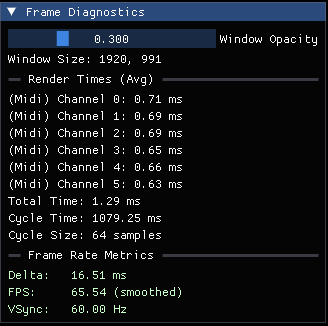
Render Times
- Each channel has its own render thread and that render thread reports how long it takes to render
Total Time: time taken to render a frame from start to endCycle Time: is a dev metric. It's related to the RingBuffer that holds the historical data for render times. It indicates how long it takes for a RingBuffer's data to be filled.Cycle Size: is a dev metric, indicating how much historical data is held in the internal RingBuffer
Frame Rate Metrics
Delta: is the amount of time between frames. It should remain around 1/FPS (e.g., 1/60 = 16.7ms).FPS: frames per second. It'll be smoothed, meaning that it's an average.VSync: the locked frame rate
Main Menu
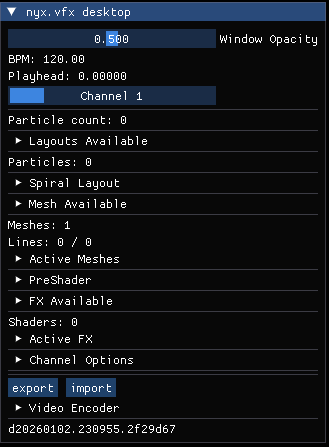
Layouts
A layout is a pattern used for generating particles.
| Name |
|---|
| Empty |
| Random |
| Spiral |
| Lissajous Curve |
| Golden Spiral |
| Elliptical |
| L-System Curve |
Behaviors
Behaviors exert influence on the particles, in that they cause them to move in some way.
| Name |
|---|
| Free Fall |
| Jitter |
| Magnetic |
| Energy Flow Field |
| Wave |
Meshes
Meshes are lines between particles that create a network.
| Name |
|---|
| Sequential |
| Full Mesh |
| Ring Zone |
| KNN (Nearest Neighbor) |
PreShader
I've written an extensive article on what PreShaders are, what they're used for, and when they occur. (https://nyxfx.dev/nyx-vfx-preshader-pipeline-architecture/)
FX Available
These are the heart of the entire system. These are a bunch of OpenGL shaders with controls that allow you to create a virtually unlimited number of effects.
| Name | Type |
|---|---|
| Empty | Utility |
| Color | Utility |
| Feedback | Utility |
| Transform | Utility |
| Gauss Blur | Blur |
| Shock Bloom | Blur |
| DK Blur | Blur |
| Glitch | Impact |
| Rumble | Impact |
| Strobe | Impact |
| Cosmic-Kaleido | Warp |
| Density Map | Warp |
| Noise Warp | Warp |
| Ripple | Warp |
Video Encoder
The video encoder records the screen. At the moment, only the RawRGBA format is available because it's supported on all hardware.
Exporting Videos
Videos are exported via Raw RGBA. RGBA creates massive files. You'll want to convert these using via FFMPEG (a free tool) to MP4 or some other format. Here's an example.
ffmpeg.exe -f rawvideo -pix_fmt rgba -s 1280x768 -r 60 -i video_in.rbga -c:v libx264 -pix_fmt yuv420p video_out.mp4
- Ensure that
60is the right value (check your JSON meta data) - Look at the JSON metadata file for the actual width and height (
1280x768) - Change the
video_in.rgbato your file - Change the
video_out.mp4to whatever you want
Caveats
- Automation
- Parameters are limited to a number of slots (256 right now)
- This is due to the VST3 API that requires ALL parameters to be declared on plugin initialization
- Parameters are ephemeral because they are reused (if you close an FX and then reopen the same FX, then those VST parameter bindings might be different)
- Parameters are limited to a number of slots (256 right now)
- [Windows] Framerate locked
- Desktop Window Manager (DWM) cannot be bypassed (safely). The plugin will attempt to use 120 FPS, but it will automatically adjust to what the OS allows.
- Whenever a video is exported, the JSON meta data will indicate the FPS (most likely 60 FPS)
- Reopening the UI
- Whenever you close the plugin's UI, it will attempt to serialize the data. When you reopen the plugin's UI, it will attempt to deserialize that data, so you keep your settings. There are components that are outside this process, such as the PreShaders.
Download
Visit the Plugins page (https://nyxfx.dev/plugins)