Overview
The NebulaDrift is the new kid on the block. It's a cloud-style effect (e.g., fog, smoke, haze). It was inspired by the effects of spell casts in old-school cRPGs.
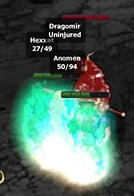
The image above is from Baldur's Gate 2, which predates the implementation of programmable shaders on mainstream consumer hardware. We'll see if we can dissect it and come up with a strategy of our own and see how close we can can get... or not. It's so easy to get distracted and end up somewhere else.
Key Shader Components
The code is still a work-in-progress, but I realized that I haven't really had a chance to share much GLSL code yet, so I thought it would be useful to go through some of the fragment shader to see what makes it tick.
Before I dive in, I want to mention how heavily this effect relies on the PreShader pipeline, which you can read about here: https://nyxfx.dev/nyx-vfx-preshader-pipeline-architecture/
For Those Who Don't Want to GLSL
If you don't GLSL or don't care about details, then let me just hit the following two points:
1) Smoke is just history sampled from a shifted coordinate
vec4 hist = texture2D(u_history, uv - warp);
2) On each frame: decay old smoke + add new smoke
hist *= u_decay;
vec4 fog = hist + injectFog; // mix the old and the new
And that's basically it.
For Those Who Want to GLSL
1) Colored density injection (how "fog gets created")
vec4 pD = texture2D(u_densityP, uv);     // particle density preshader
vec4 lD = texture2D(u_densityL, uv);     // line density preshader
vec4 sD = pD + (u_useLineDensity * lD);
- u_densityP and u_densityL are our PreShader textures
- We add them, which means more stuff here = more fog source here
- u_useLineDensity is basically a switch/weight for including lines.
Premultiplied color + weight
vec3 col = sD.rgb / max(sD.a, 1e-5);
Because we store density as premultiplied RGB, we have the following meanings:
- A weight
- RGB is "color energy" already multiplied
To recover the true hue, we divide by alpha (the weight).
Fog thickness
float d = max(sD.a, 0.0); d = pow(d, u_fogGamma);
This is a shaping curve:
- u_fogGamma > 1 = thinner fog except where density is strong (wispy)
- u_fogGamma < 1 = fog spreads more uniformly (hazy)
Saturation boost
float lum = dot(col, vec3(0.299, 0.587, 0.114));
col = mix(vec3(lum), col, u_satBoost);
This interpolates grayscale and original color.
- u_satBoost = 0, then fog is monochrome
- u_satBoost = 1, then fog preserves the user's chosen colors
The injection packet
vec4 injectFog = vec4(col * d, d) * (u_inject * u_fogIntensity);
This is akin to adding new smoke to this frame:
- RGB = colored smoke amount
- A = how much smoke exists here
- u_inject is the gain knob
- u_fogIntensity is the global "how thick is the medium" knob
This is the source term in a fluid sim.
2) Velocity decode (i.e., how we get where smoke wants to go)
vec4 vf = texture2D(u_velocity, uv); // Velocity PreShader
vec2 dir = vf.rg * 2.0 - 1.0;
float w = clamp(vf.a, 0.0, 1.0);
Velocity is an encoded direction in RG in [0..1], so we decode back to [-1..1]. Alpha is the confidence/strength mask.
Velocity is advisory, i.e., it's not always present or strong.
Making velocity optional
float flowW = mix(1.0, w, u_velInfluence);
flowW = max(flowW, u_flowFloor);
- u_velInfluence = 0, then ignore velocity mask (full flow everywhere)
- u_velInfluence = 1, then flow strength tracks velocity alpha
- u_flowFloor prevents dead zones so the fog still drifts even with no motion
This is why the effect doesn’t freeze when velocity is sparse.
3) Advection warp
Helps give the illusion of smoke:
vec4 hist = texture2D(u_history, uv - warp);
hist *= u_decay;
vec4 fog = hist + injectFog;
That is fluid-ish advection in 3 lines.
- u_history is the fog from last frame.
- We sample it at an offset UV (
uv - warp), so it looks like the fog was carried by motion. - Multiply by u_decay, so it gradually fades instead of accumulating forever.
- Add injectFog to inject new smoke.
This essentially creates:
- trails
- persistence
- motion smear
Warp components
We build warp from:
Velocity-driven drift
// velocity-driven drift
vec2 velWarp  = dir * (u_flowStrengthPx * flowW) * u_invRes;

// constant wind
vec2 windWarp = windDir * u_windStrengthPx * u_invRes;

// switch (vortex field)
vec2 swirlPx = tang * (u_swirlStrengthPx * t * sign(u_swirlDir));
swirlWarp = swirlPx * u_invRes;

// warp it all!
vec2 warp = velWarp + windWarp + swirlWarp;
This is what makes the effect so controllable:
- velocity makes it feel attached to particles/lines because of all the historical data
- wind gives us the global direction
- swirl gives us composition control (galaxy, whirlpool, vortex, hence where the name comes from)
The swirl falloff helps shape the swirl
float t = 1.0 - clamp(dist / u_swirlRadiusPx, 0.0, 1.0);
t = pow(t, u_swirlFalloff);
- bigger radius = larger vortex footprint
- bigger falloff = tighter core
4) Compositing fog back onto scene
We have two simple modes available:
Additive
outc = scene + fog;
This style helps make it look like "light fog"
Alpha-driven overlay
float a = clamp(fog.a, 0.0, 1.0);
outc = mix(scene, scene + fog, a);
Instead of "fog over scene" we we a "scene plus fog, but only where fog is dense". This prevents that blanket look, which can be a bit unnatural.
Conclusion
Below is a clip on youtube showing some of the options.